Lighting Guide
Golden Hour Photography Tips
The best natural light window of the day, and how to make the most of it.
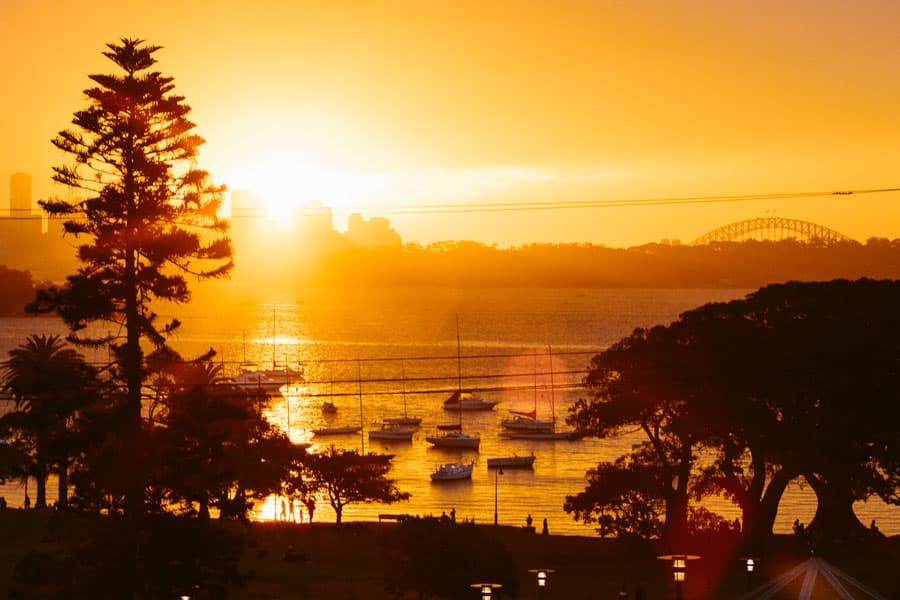
Golden hour is the period shortly after sunrise and before sunset when natural light is warm, soft, and directional. It produces the most flattering light for photography. This guide covers when golden hour happens, camera settings for different scenarios, and techniques for making the most of it, written by Daniel Bilsborough, a National Geographic-featured photographer based in Melbourne.
What Is Golden Hour
Golden hour is the period roughly one hour after sunrise and one hour before sunset. The sun sits low on the horizon, light travels through more atmosphere, and it arrives warm, soft, and directional.
This light is forgiving in ways midday sun isn't. Shadows are long but not harsh. Skin tones glow. Landscapes get depth. It's why professional photographers schedule outdoor shoots around these windows and avoid shooting at noon.
The exact timing changes with your latitude and the season. In Melbourne, summer golden hour can stretch longer because the sun sets gradually. In winter, it's shorter and more intense. Apps like PhotoPills or The Photographer's Ephemeris give you precise times for your location.
Why Golden Hour Light Looks So Good
- ■Warm colour temperature. The light shifts towards orange and gold. This flatters skin tones and adds richness to landscapes that cool, overhead light can't replicate.
- ■Directional and low angle. Side-lighting creates texture, depth, and dimension. Long shadows add drama. Backlit subjects get a natural rim light (that glowing edge around hair and shoulders).
- ■Soft quality. The light is diffused by more atmosphere. Shadows are present but not harsh. Contrast is manageable. You can expose for highlights and shadows simultaneously, which is nearly impossible at noon.
- ■Even dynamic range. The brightest brights and darkest darks are closer together. Your camera can capture the full scene without blowing highlights or crushing shadows.
Golden Hour Camera Settings
Golden hour light changes fast. The settings that work at the start of the window won't work 20 minutes later. Stay in manual mode and keep adjusting.
Expose for the face, not the sky. The background will blow out slightly, and that's the look.
Side light adds texture and depth. Slight shadow on one side of the face is flattering, not a problem.
Stop down for front-to-back sharpness. Use a tripod if shutter speed drops below 1/60s.
Point your camera toward the sun. Expose for the sky (meter off the bright area). Your subject goes dark. That's the point.
Techniques to Try at Golden Hour
Backlighting
Put the sun behind your subject. You'll get a glowing rim of light around their outline and warm, hazy light in the frame. Expose for the subject's face (not the sky) and let the background blow out.
Sun Flare
Shoot directly into the sun with the sun partially obscured by a tree, building, or your subject. Remove your lens hood. The flare adds warmth and a cinematic quality. It's unpredictable, which is part of the charm.
Long Shadows
At golden hour, everything casts long dramatic shadows. Use them as compositional elements: leading lines, patterns, or abstract shapes that add depth to otherwise flat scenes.
Warm vs Cool Contrast
Where golden hour light hits, everything is warm. Where shadow falls, the tones stay cool and blue. This natural warm/cool contrast creates visual depth without any editing.
White Balance at Golden Hour
Auto white balance will try to "correct" the warm tones and cool them down. That defeats the entire point. Set white balance to Daylight (or ~5200K) to preserve the golden warmth. Or shoot RAW and set it in post.
If you want to push it even warmer, try Cloudy (~6500K) or Shade(~7500K) white balance presets. These add warmth beyond what's already there.
Learn to Read Light in Person
Golden hour is the easiest light to work with, but understanding why makes you better in every condition. Daniel Bilsborough's photography course in Melbourne teaches you to read and control light in a hands-on 3-hour session.
Golden hour is also the perfect time for portrait photography. And if you want to practise in Melbourne's best locations, check out our guide to photography walks in Melbourne.